eIDs
Learn how to authenticate users with Swedish BankID via Idura. This page covers token contents, test user creation, production access, BankID in telephone calls, and other BankID specifics.
Idura helps you add BankID logins to your website or application. You integrate with Idura using one of our SDKs or a standard OpenID Connect library. We handle the BankID API integration for you. When you’re ready to go live, you order a certificate from Swedbank through the Idura dashboard.
| Country | Sweden |
| Operated by | Finansiell ID-Teknik BID AB |
acr_values |
|
| Levels of assurance (LoA) | Substantial |
| User data | name · family_name · given_name · ipaddress · country |
| Optional user data | evidence · ocspResponse (evidence scope) |
| Caller authentication | BankID in phone calls |
| Headless authentication | Headless flow |
Once a user has successfully authenticated with BankID, Idura Verify issues an ID token in JWT format to your application. The token contains a set of claims about the user and the authentication event itself. The examples below show the structure of the ID tokens issued for Swedish BankID logins.
If your use case requires verifying the signature (which is not required, but possible), you have an option to request the evidence data as returned by the underlying eID provider.
This can be done by adding scope=openid evidence (or login_hint=scope:evidence) to your authorize request.
With this configuration, the issued JWT will contain two additional claims: evidence and ocspResponse:
The full content of evidence and ocspResponse is omitted for brevity.
When included in the payload, evidence and ocspResponse claims will significantly increase the size of the JWT token, potentially causing it to exceed the size limitations of an HTTP header. The bloated JWTs would thus become unusable as Bearer tokens for accessing APIs.
To address this concern, consider changing the response type in your authorization request to response_type=code id_token.
In this case, a more compact ID Token with only essential claims will be issued from the Token endpoint. The client can subsequently fetch all data about the user from the Userinfo endpoint.
_ With code id_token response type, the ID Token from the token endpoint will always be the same (and have nothing but a sub that is user-specific). In contrast, when using the response_type=code, the full ID Token is returned immediately in exchange for code._
Swedish BankID test users are created at the Demo Bank web site.
For more information on how to configure your device for test and setup test users, see BankID for test. Follow the steps outlined in the guide:
Get a BankID for test (without an existing production/test BankID)
Log in at the Demo bank website with a Personal code option. The code will be sent to you by email.
Once logged in, create a test user by selecting Mobile BankID or BankID on file (for desktop version) option under Issue BankID for test. Please note that a test user must be created with a valid Swedish personal identity number (“Personnummer”). You can generate a valid Personnummer using one of the available online tools, such as this generator. After creating a test user, you will be able to link it to the mobile or desktop version of the test app.
For future test user issuances, you can log in using an already-issued BankID test user by selecting the Test BankID option during login.
Note that, as is also described on the website, using test BankID users does require a reconfiguration of the BankID application. This means it cannot be used for real BankID. So if you are Swedish and already have BankID on your phone, you may want to use a spare phone for testing.
BankID in phone calls
facilitates user authentication during a phone call.
For details and integration instructions, see Caller Authentication with CIBA.
Headless authentication is designed for flows where you want maximum control over how user interacts with same device and QR flows for BankID.
For instance you could render the QR flow in your own website, or trigger app2app in your native app without having to open a browser
Idura Verify facilitates Swedish BankID headless authentication via the Headless flow.
The Headless flow is only available to traditional server-based web applications (confidential clients) and requires client validation for authentication requests. We’ll use private key JWTs for authentication in the example below. An alternative (less secure) approach is to use client_secret for authentication.
HTTP POST request to the /headless/authorize endpoint:# Replace `$client_assertion` with your JWT assertion
# Replace `YOUR_DOMAIN.idura.broker` with your Idura domain
HTTP POST https://YOUR_DOMAIN.idura.broker/headless/authorize
Content-Type: application/x-www-form-urlencoded
scope=openid
&end_user_ip=127.0.0.1
&acr_values=urn:grn:authn:se:bankid
&client_assertion_type=urn:ietf:params:oauth:client-assertion-type:jwt-bearer
&client_assertion=$client_assertion{
"headless_req_id" : "3857f8ff-21b9-48ae-a732-a3bd8128a7ae",
"expires_in" : 120,
"acr_data": {
"qrData": "bankid.5367b735-a3f9-47d9-aafc-6d2ad5a14901.0.425c66c472e756fc6a070b86eef1adb4fac0a2714d828c902afa77a5b15e8590",
"autoStartToken": "d2c96ea2-f8d9-4e9f-8d39-4f2e88e10e1c"
}
}/oauth2/token) to get a response with an ID token.
The headless_req_id is used to construct a poll request on the token endpoint:# Replace `HEADLESS_REQ_ID` with the id returned by authentication response
# Replace `$client_assertion` with your JWT assertion
HTTP POST https://YOUR_DOMAIN.idura.broker/oauth2/token
Content-Type: application/x-www-form-urlencoded
headless_req_id=HEADLESS_REQ_ID
&grant_type=urn:urn:params:grant-type:headless
&client_assertion_type=urn:ietf:params:oauth:client-assertion-type:jwt-bearer
&client_assertion=$client_assertionPolling Frequency: Bear in mind, that the authentication process requires interacting multiple times with the end-user, so the identification process could take some time. Consequently, the token endpoint should be polled every 5 seconds.
On successful user identification, a successful token response is returned, e.g.:
{
  token_type: 'Bearer',
  expires_in: '120',
  id_token: 'eyJ0eXAiOiJKV1QiLCJhbGciOiJSUzI1NiIsImtpZCI6IjgyN0Q5QTNFOTg2MTY0OTVBQzZGRTE3MUFFNkRBM0IzQ0ExNDE5MjEifQ.eyJpc3MiOiJodHRwczovL25hdGFsaWEtZGV2LXRlc3QuY3JpaXB0by5pbyIsImF1ZCI6InVybjpjaWJhIiwiaWRlbnRpdHlzY2hlbWUiOiJzZWJhbmtpZCIsImF1dGhlbnRpY2F0aW9udHlwZSI6InVybjpncm46YXV0aG46c2U6YmFua2lkIiwiYXV0aGVudGljYXRpb25tZXRob2QiOiJ1cm46b2FzaXM6bmFtZXM6dGM6U0FNTDoyLjA6YWM6Y2xhc3NlczpTb2Z0d2FyZVBLSSIsImF1dGhlbnRpY2F0aW9uaW5zdGFudCI6IjIwMjQtMDUtMjJUMTA6NDE6NDEuMzYxWiIsIm5hbWVpZGVudGlmaWVyIjoiYmI5YzIzNjRkZmFlNDRmM2JjZmQ5OTkwNTNkOTRmOWUiLCJzdWIiOiJ7YmI5YzIzNjQtZGZhZS00NGYzLWJjZmQtOTk5MDUzZDk0ZjllfSIsInNlc3Npb25pbmRleCI6ImI2NWYxMWI2LWViYTctNDg4Mi05MDBhLTVmMmQ5M2EzOGRiYSIsInNzbiI6IjE5NjgwMjAyMDU3NSIsIm5hbWUiOiJUZXJuZSBQYXVsc2VuIiwiZ2l2ZW5uYW1lIjoiVGVybmUiLCJnaXZlbl9uYW1lIjoiVGVybmUiLCJzdXJuYW1lIjoiUGF1bHNlbiIsImZhbWlseV9uYW1lIjoiUGF1bHNlbiIsImlwYWRkcmVzcyI6IjE4NS4xNTcuMTM0LjEzNCIsImNvdW50cnkiOiJTRSIsImlhdCI6MTcxNjM3NDUwMSwibmJmIjoxNzE2Mzc0NTAxLCJleHAiOjE3MTYzNzU3MDF9.RVQnlukfoH597uXzE1Gays5DElGzAr8xgOmi7ZWppaL3QPGhV4vK2o6qLhxXg_-FKG9xCwHR6gEhnNzWA3W3B6Q2zJeQTYh9okUvTmmhAFIyDL7lEtfWVVKUKvauDisYVZDjAxJQS_1zbgPEi5I-UJ6_kvMGH-wC13MAD2bZGTGR2dR-ZevBUn7plOt0PKXrIZD3vwxDfebTMPQqX_9SNT5F7GLjCcpeVK-T5LOgmUMFcTAbHvNyklqP5ymRHsZLDw_ib4I7ZqODhR-3uISWo1NvG4Y84iBcqv50WRNlmMUm004LfPw1flM5DNsVyUWCqYW8m7eBEwLp5va-6OQG4w',
  access_token: 'cf1ce646-7fbe-4740-9c56-fe3f0891f6c6'
}
The user has not yet completed the authentication, acr_data.hintCode provides details as to how far they are in the process.:
HTTP/1.1 400 Bad Request
{
  "error": "authorization_pending",
  "error_description": "awaiting first user interaction",
  "acr_data": {
    "qrData": "bankid.5367b735-a3f9-47d9-aafc-6d2ad5a14901.0.425c66c472e756fc6a070b86eef1adb4fac0a2714d828c902afa77a5b15e8590",
    "hintCode": "...."
  }
}
The user did not acknowledge that the identification request warranted or canceled the request before identification was performed:
HTTP/1.1 400 Bad Request
{
  "error": "access_denied",
  "error_description": "user declined"
}Swedish BankID supports signing text and markdown.
Text signing is triggered by using the action and message parameters via login_hint.
action parameter must be set to signmessage parameter must be base64 encoded and at most 40,000 characters after base64 encoding.message parameter supports markdown text.Note: Signing produces very large JWTs that are not appropriate for authentication/Bearer header use
Text signing has a different eID cost than authentication. If you have questions, please contact sales.
login_hint=action:sign message:VmVuZG9yOgoKIyMgQ29vbCBEZWxpdmVyeQoKQW1vdW50OgoKIyMgMzAwIEVVUgoKLS0tCgpJIGFwcHJvdmUgdGhpcyB0cmFuc2FjdGlvbi4=
Try out the example in our URL builder
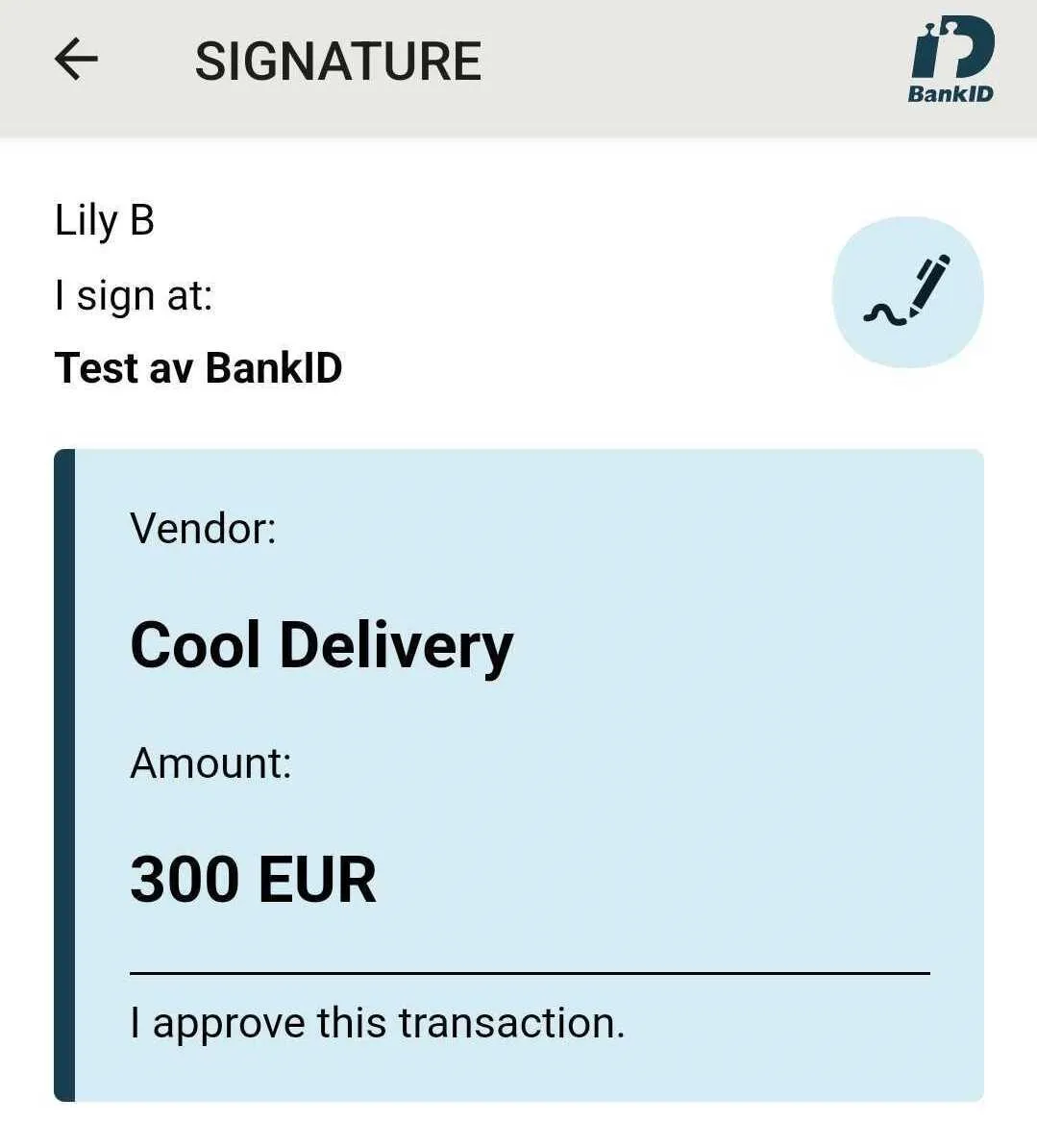
Swedish BankID allows you to send data along in both authentication and signature flows,
which they will then embed in the evidence claim after a flow completes succesfully.
You can supply this value via a nonVisibleData parameter in the login_hint.
The supplied value must be base64 encoded.
Idura does not attempt to parse or validate the value, we only pass on what is given to the native provider API.
login_hint=nonVisibleData:bm90IHZpc2libGUgdG8gZW5kIHVzZXJzLCBhY2Nlc3NpYmxlIGluIHRoZSBgZXZpZGVuY2VgIGNsYWltIGFmdGVyIGEgZmxvdyBjb21wbGV0ZXMgc3VjY2VzZnVsbHk=
Try out the example in our URL builder
To start accepting real users with Swedish BankID, you must order a certificate that identifies your organization. You order it through the Idura dashboard.
Idura acts as a reseller for Swedbank, which means that your order goes through a simple approval process with Swedbank. The process is managed by Idura.
Prerequisites for ordering
To order a BankID certificate for your company, you must meet these basic requirements:
To order:
After you submit, Idura reviews your order and forwards it to Swedbank for approval. Once approved, we install the certificate in your Idura tenant. Expect 8-15 working days from submission until BankID is enabled in production. The dashboard shows the status of your order.